

TL;DR:
- Understanding container lifecycles helps manage costs, reliability, and operational control in both software and physical domains.
- Proper handling of each lifecycle stage prevents costly failures, data loss, and premature replacements through proactive management and best practices.
Most people assume a container's lifecycle is simple: you start it, use it, and stop it. That assumption costs real money. Whether you're managing Docker containers in a production environment or procuring physical shipping containers for job site storage, what is container lifecycle really means is this: every container passes through defined stages, and what happens at each stage determines your cost, reliability, and operational control. Skipping that understanding doesn't simplify things. It creates expensive surprises.
Table of Contents
- Key takeaways
- What is container lifecycle in software and shipping contexts
- Docker container lifecycle stages
- Kubernetes pod and container lifecycle
- Software containers vs. physical containers: lifecycle compared
- Best practices for container lifecycle management
- My take on why lifecycle understanding is undervalued
- Get the right container for every lifecycle stage
- FAQ
Key takeaways
| Point | Details |
|---|---|
| Lifecycle has defined stages | Every container, physical or software, moves through creation, use, maintenance, and retirement phases. |
| Docker containers have five states | Created, Running, Paused, Stopped, and Removed each require different handling to avoid data loss. |
| Kubernetes adds orchestration layers | Pod lifecycle phases and container states work together to automate scaling and recovery decisions. |
| Physical containers need active management | Procurement grade, maintenance scheduling, and retirement timing directly affect cost and longevity. |
| Lifecycle knowledge drives procurement decisions | Understanding container lifecycle stages helps you buy the right grade, size, and condition for your actual use case. |
What is container lifecycle in software and shipping contexts
The term "container lifecycle" applies to two genuinely different domains, and confusing them is more common than you'd expect. In software development, a container is a lightweight, isolated unit that runs application code. In logistics and construction, a container is a steel box that moves or stores goods. Both share a core concept: they are resources with a beginning, an active phase, and an end. Understanding container lifecycle means recognizing that each stage creates obligations and decisions.
For software engineers and DevOps teams, understanding container lifecycle is the foundation of reliable deployments. For businesses buying or renting physical shipping containers, the same logic applies to procurement, maintenance, and eventual retirement. The stages differ in their mechanics, but the management discipline is identical. Knowing where a container sits in its lifecycle tells you what action to take next.
Docker container lifecycle stages
The Docker container lifecycle moves through five primary states, and each transition matters operationally.
- Created. The container exists as a configured object but has not yet started running. Resources are allocated, but no process is executing.
- Running. The container's main process is active. This is the operational state where your application serves traffic, processes data, or handles jobs.
- Paused. The container's processes are suspended using cgroup freezer signals. The container still occupies memory but does nothing. This is useful for debugging or temporarily freeing CPU without losing state.
- Stopped. The container has exited. According to the Docker container lifecycle, the default "docker stop` command sends a SIGTERM signal and then waits 10 seconds before issuing a SIGKILL if the process hasn't exited on its own.
- Removed. The container is deleted entirely. Its writable layer is gone. You cannot recover it unless you committed it to an image first.
The difference between stopping and killing a container is not cosmetic. Stopping sends SIGTERM to allow graceful cleanup, while killing sends SIGKILL immediately, which risks data corruption and incomplete transactions. Most production incidents involving data loss during deployments trace back to teams that defaulted to docker kill without understanding the implications.
One of the most misunderstood failure modes in the Docker container lifecycle is the PID 1 problem. When a container starts, its entrypoint process runs as PID 1. The Linux kernel treats PID 1 differently from other processes. If your application doesn't explicitly handle SIGTERM, PID 1 ignores the signal by default, and the container hangs until Docker forces a kill after the grace period. The fix is either building signal handling into your application or using a lightweight init process like tini as your entrypoint.
Pro Tip: If you're running shell scripts as your Docker entrypoint, use exec to replace the shell process with your application. This transfers PID 1 ownership to your app and allows proper signal forwarding without additional tools.
Kubernetes pod and container lifecycle
Kubernetes adds orchestration layers on top of individual container states, and understanding both levels is critical for managing complex deployments.
At the Pod level, Kubernetes tracks five lifecycle phases:
- Pending. The Pod has been accepted by the cluster but containers are not yet running. Images may still be pulling.
- Running. At least one container is active. The Pod has been bound to a node.
- Succeeded. All containers exited with status code 0 and will not restart.
- Failed. At least one container exited with a non-zero status and will not be retried under the current policy.
- Unknown. The Pod state cannot be determined, usually because of a node communication failure.
Inside each Pod, individual containers have their own states: Waiting, Running, or Terminated. These map to the Kubernetes Pod lifecycle phases and give you finer-grained visibility into what's actually happening at the process level.
| Level | States/Phases | What it tells you |
|---|---|---|
| Pod | Pending, Running, Succeeded, Failed, Unknown | Overall health and scheduling status |
| Container | Waiting, Running, Terminated | Process-level execution state |
| Lifecycle hooks | PostStart, PreStop | Custom code execution at state transitions |

Lifecycle hooks give you control at the transition points. The PostStart hook runs immediately after a container starts, though it is not guaranteed to run before the container's main process. The PreStop hook runs before a container is terminated and is your opportunity to drain connections, flush buffers, or notify upstream systems. Critically, PreStop must complete before the termination grace period expires or Kubernetes will force-kill the container regardless.
Pro Tip: Always set your terminationGracePeriodSeconds to be longer than your PreStop hook's maximum expected runtime plus your application's own shutdown time. A PreStop hook that runs for 25 seconds inside a 30-second grace period leaves almost no room for the actual shutdown process.
Restart policies also shape how container lifecycle works in Kubernetes. The three options are Always, OnFailure, and Never. Choosing Always for a batch job that exits with code 0 on completion creates an infinite restart loop. Matching your restart policy to your workload type is one of those details that seems minor until it takes down a node.
Container orchestration at scale removes the need for constant manual lifecycle handling, but that automation only works correctly when you've defined your lifecycle expectations precisely through policies, hooks, and resource limits.
Software containers vs. physical containers: lifecycle compared
The concept of container lifecycle management applies directly to physical shipping containers, and the parallel is closer than most people expect.
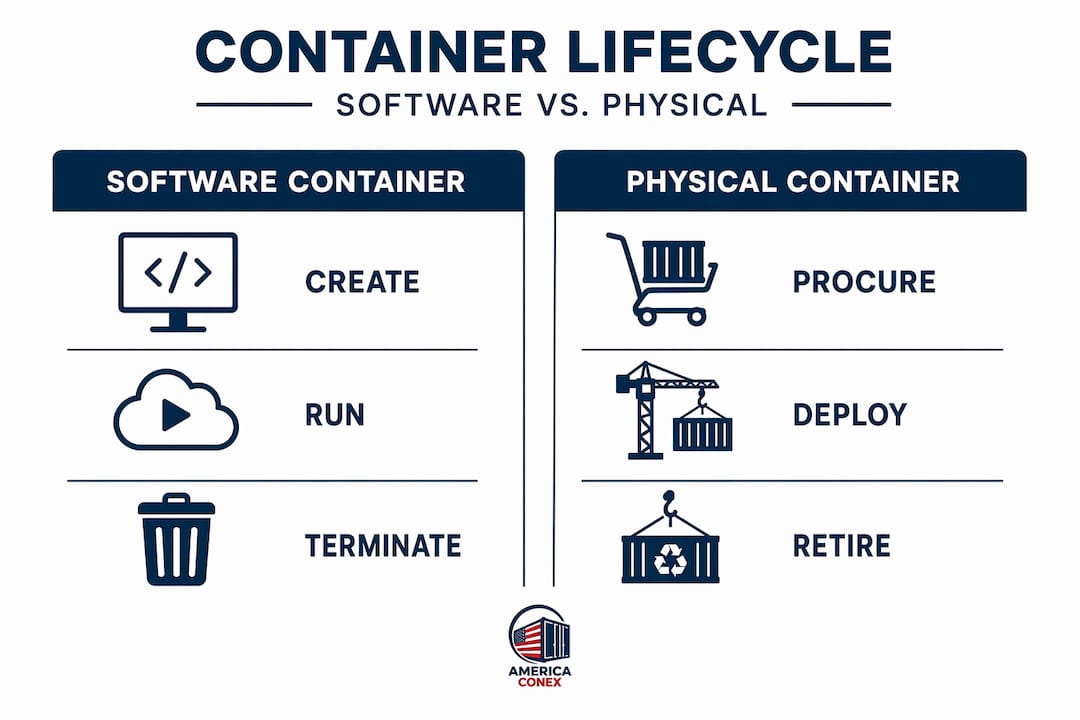
Physical container lifecycle includes four core stages: procurement, deployment, maintenance, and retirement. Procurement means selecting the right grade and size for your actual use case, not just the cheapest available unit. Deployment covers where the container goes, how it's positioned, and what environmental conditions it will face. Maintenance determines how long the container remains useful. Retirement is the decision point when repair costs exceed replacement value.
| Dimension | Software container lifecycle | Physical container lifecycle |
|---|---|---|
| Creation/Procurement | Image build and container instantiation | Buying new, one-trip, or used cargo worthy |
| Operational state | Running, Paused, Stopped | Active shipping, storage deployment |
| Health monitoring | Health checks, liveness probes | Physical inspection, rust and seal checks |
| Maintenance | Image updates, config changes | Repainting, floor replacement, door seal repairs |
| Retirement | Container removal, image deletion | Scrap, repurpose, or resale |
For businesses using physical containers, lifecycle management impacts operational efficiency and total cost of ownership in ways that become apparent only after the fact. A wind and water tight (WWT) unit might be perfect for dry goods storage but wrong for a multi-year job site in a coastal environment. Matching container grade to lifecycle expectation at the procurement stage prevents expensive mid-cycle replacements.
The key management considerations for physical containers include:
- Inspection frequency. Containers in active use outdoors need quarterly checks at minimum for floor integrity, door seals, and surface rust.
- Positioning. Containers stored on soft ground without proper support develop structural issues faster. Gravel pads or railroad ties extend lifespan considerably.
- Climate exposure. Salt air, extreme temperature swings, and standing water accelerate corrosion and seal degradation.
- Documentation. Tracking delivery date, condition at procurement, and maintenance history lets you make data-driven retirement decisions instead of guessing.
Good container storage practices address all of these points and directly extend the productive life of your unit.
Best practices for container lifecycle management
Whether you're managing containers in Kubernetes or on a job site, the same underlying discipline applies: define your lifecycle expectations before deployment, not after problems appear.
For software containers:
- Use
tiniordumb-initas your Docker entrypoint to resolve PID 1 signal handling issues without rewriting application code. - Set explicit
terminationGracePeriodSecondsvalues based on measured shutdown times, not defaults. - Write PreStop hooks that are fast and deterministic. Long-running PreStop logic that depends on external services will fail unpredictably under load.
- Monitor container restart counts. A container restarting more than a few times per hour signals a lifecycle configuration problem, not an application bug.
For physical shipping containers, extending container life starts with maintenance discipline from day one rather than reacting to visible damage. Repaint bare metal within the first year. Replace door gaskets before they crack completely. Check and lubricate locking rods annually.
Pro Tip: For Kubernetes workloads, pod-level resource management allows in-place scaling without killing and restarting containers. This is worth implementing for stateful workloads where restart costs are high.
My take on why lifecycle understanding is undervalued
I've watched teams deploy Kubernetes clusters worth hundreds of thousands of dollars in infrastructure spend without anyone on the team being able to explain what happens when a Pod enters the Failed phase. That's not a hypothetical. It's a pattern I've seen repeatedly across engineering organizations of all sizes.
The lifecycle knowledge gap creates real operational pain. A missing PreStop hook causes in-flight requests to drop during deployments. An unhandled PID 1 problem turns a 10-second deployment into a 2-minute one across dozens of containers, adding up to meaningful deployment window violations. These aren't edge cases. They're predictable failure modes that lifecycle understanding prevents.
On the physical side, I've seen businesses buy used containers without asking about grade, only to discover 18 months later that a WWT unit they stored electronics in had a compromised floor seal that allowed moisture intrusion. The procurement decision and the lifecycle expectation were never matched. That's the same problem as a Kubernetes restart policy mismatch, just expressed in steel and humidity instead of exit codes.
Integrated lifecycle thinking means asking the right question at the start: how long do I need this container, under what conditions, and what does the end of its useful life look like? That question changes every decision that follows.
— Alex
Get the right container for every lifecycle stage
Americaconex supplies new and used shipping containers nationwide, with options matched to every stage of the physical container lifecycle. Whether you need a one-trip container for a long-term deployment or a WWT unit for short-term job site storage, Americaconex has the grades and sizes to fit your actual use case. Standard and high cube units in 20ft and 40ft are available with fast delivery from 30+ depots across the country. Local offices in Seattle, Chicago, and Indianapolis provide tailored service and transparent pricing from inquiry through delivery. Browse container dimensions and reach out to match your procurement decision to your lifecycle requirements.
FAQ
What are the main container lifecycle stages?
Container lifecycle stages vary by context. Docker containers move through Created, Running, Paused, Stopped, and Removed. Physical shipping containers move through procurement, deployment, maintenance, and retirement.
How does the Docker stop command work in the container lifecycle?
The docker stop command sends a SIGTERM signal to the container's main process and waits 10 seconds before issuing a SIGKILL if the process has not exited. This grace period allows applications to shut down cleanly.
What is the PID 1 problem in container lifecycle management?
PID 1 in a container does not forward signals by default, which causes the container to ignore stop commands and hang until it is force-killed. Using an init process like tini resolves this without modifying application code.
How do Kubernetes lifecycle hooks affect container behavior?
The PostStart hook runs immediately after a container starts, and the PreStop hook runs before termination. If a PreStop hook exceeds the termination grace period, Kubernetes will force-kill the container before it completes.
What does container lifecycle management mean for physical shipping containers?
For physical containers, lifecycle management covers selecting the right grade at procurement, maintaining structural integrity during deployment, and making data-informed retirement decisions to control total cost of ownership.